

2025 Agentic Developer Tooling - A Guide
The space is changing at a rapid pace. Underneath it all, there are some common concepts emerging - let's dig into what they are and how they can help.
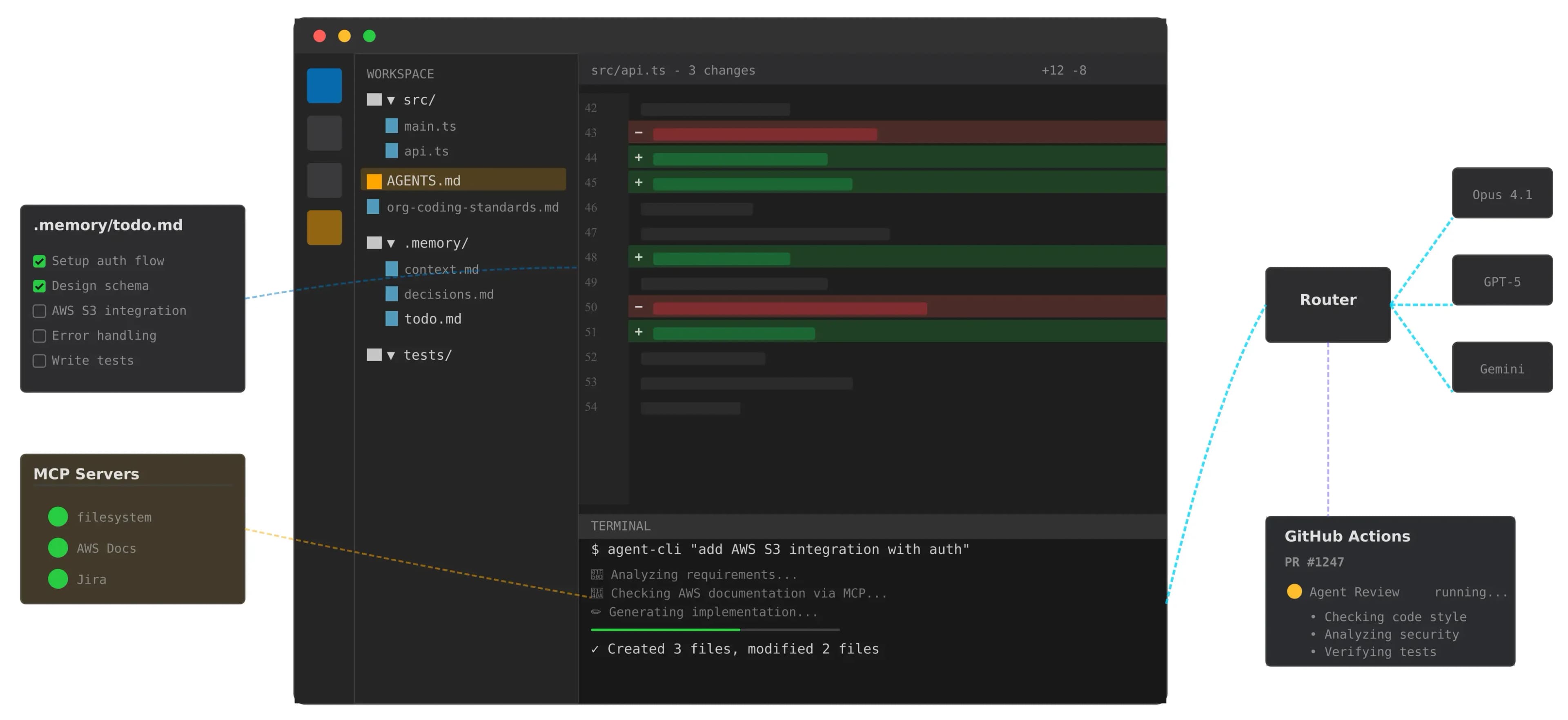
Recently I’ve been trying out different types of AI tooling, and it’s incredible just how much the AI developer tooling space has changed in 2025.
Just a year ago, I was using Copilot to finish a function or add some tests. Now? We've got AI “agents” that can navigate entire codebases, coordinate with each other, run tests, and push PRs—all while we're grabbing coffee. The shift from simple text generation to autonomous development assistants has happened in a flash, and developers are scrambling to get up to speed.
The good news is that beneath all this complexity, there are a handful of core patterns and concepts emerging. Once you grasp them, you can evaluate any new tool that appears next week and understand where it might add value in your workflow.
Terminology That Matters
First, let's decode some jargon.
Agentic vs Generative AI
Generative AI is what we started with: you prompt, it responds, done. It's a one-way transaction. Agentic AI can make decisions, store knowledge, work with tools, and iterate to get the job done. It has goals and can figure out how to achieve them.

Tool Use/Function Calling
Instead of just telling you what to do, agents can run commands, call APIs, modify files, search the web, etc. Not all models are great at knowing how and when to use tools, but that’s improving.
MCP (Model Context Protocol)
A universal adapter for AI assistants to access external data, tools, etc. Each MCP “server” provides a variety of tools. Examples include searching AWS docs, fetching Figma designs, accessing Confluence/Jira, controlling browsers - the list goes on. MCP servers increase what agents can do.
Reasoning Models
These AI models "think" before responding. They work through problems step-by-step, and consider different approaches. High levels of reasoning ability are great for any task requiring careful analysis and planning. However, more reasoning generally means higher costs and slower responses.
Multi-agent orchestration
Modern tooling allows us to create a team of specialist agents. For example, you could have one that excels at research, another at writing, another at fact-checking, etc. They might use different models to balance cost with reasoning ability. An orchestrator can come up with a plan to make use of these different agent types, like any other tool, to achieve an objective.
Steering Files
Guidance given to an agent. This can be personal, project, or org level preferences or context (e.g. “be direct and to the point”, “this project is responsible for x, y, and z”, “prefer composition over inheritence”).
Context Windows
The agent’s working memory for a conversation/session, measured in tokens (chunks of words). The agent will consider this context along with a given prompt. Current models range from 8K tokens (about 6,000 words) to 200K+ tokens (a small book). The more steering files, MCP servers, etc that are configured, the less space there is for the history of a conversation. Some tools support reviewing the context and condensing it to enable a conversation to continue indefinitely.
How It All Fits Together
Now that we've decoded the terminology, let's see how these pieces actually work together in modern agentic development tools.
When engaging with modern agentic tooling, we can think of 3 main areas:
- User interfaces - how do we interact with agents?
- Processing layer - how does an agent get the job done?
- Context sources - how does an agent know preferences, approaches to avoid, etc?

User Interfaces - Where You Meet the AI
The interface layer has fragmented into distinct modalities, each optimized for different workflows. IDEs like Cursor, Windsurf, and Continue have become the default for many developers—they see your code changes in real-time and can respond contextually as you work. IDE Extensions (Cline, RooCode, Copilot) plug into your existing environment, adding AI capabilities without requiring a complete switch.
CLI Tools represent a different philosophy—they're IDE-agnostic and scriptable. Aider, Claude Code, and Q Developer work from the terminal, making them perfect for automation, CI/CD integration, or developers who want to keep agentic AI seperate from their IDE. Remote agents like Codex, Claude Code (in autonomous mode), and Jules take this further—they can work independently on tasks while you focus elsewhere. They can be assigned tickets to implement, or PRs to review, and be left to get on with it.
The key insight: you're not locked into one interface. Many developers use Cursor for rapid iteration during development, CLI tools for larger tasks, and remote agents for handling well defined tasks and PR reviews.
Processing Layer - The Brain of the Operation
This is where the magic happens. When you make a request, it flows through several sophisticated systems working in concert.
Tools are the hands of the system—they read documentation, control browsers, fetch designs, interact with APIs, and manipulate files. MCP servers have standardized how these tools are exposed, meaning an agent can leverage dozens of capabilities from AWS documentation to Figma designs.
Model Selection acts as the economic optimizer. Not every task needs the most powerful (and expensive) model, and depending on whether you have a subscription, are using API keys, or running LLMs locally, some models may be much cheaper than others.. Simple refactoring might go to Claude Haiku or GPT-5-mini, while architectural decisions get routed to reasoning models like Opus 4.1. This can be achieved either by tying specific agent modes to certain models, or using a platform like OpenRouter to dynamically route prompts as needed to optimise for what matters.
Memory is more nuanced than it appears. It's not just about remembering your current conversation—it's about maintaining context across sessions, understanding project evolution, and knowing what mistakes to avoid. Some tools are experimenting with vector databases for long-term memory, while others focus on optimizing session context. The challenge is balancing rich context (better results) with token consumption (higher costs).
Orchestration coordinates everything. When you ask for a complex feature, an orchestrator agent mode determines whether to use a single agent or create a plan and coordinate multiple specialists. It manages workflows—should the code be written first then tested, or should tests be written first? Should multiple approaches be explored in parallel? Modern orchestration layers can create a visible todo list or plan, spin up swarms of agents that each handle specific aspects of a problem, then synthesize their outputs.
Context Sources - The Foundation of Understanding
Context is what transforms generic AI into your personalized development assistant. This layer has become increasingly sophisticated in how it aggregates and prioritizes information.
Codebase context includes not just your files, but git history, dependency graphs, and build configurations. Modern tools build semantic indexes of your code, understanding not just syntax but architectural patterns and relationships. RAG systems make this searchable in natural language—the agent can instantly find "that authentication middleware we wrote last month." Some tools like Claude Code forgo this complexity in favour of using existing approaches (e.g. grep).
Persistent Memory is the emerging frontier. Mem0, specialized MCP servers, and markdown-based memory systems maintain knowledge across sessions. This includes learned preferences ("always use async/await"), discovered constraints ("the legacy API has a 100ms timeout"), and project evolution ("we're migrating from Redux to Zustand").
Documentation goes beyond README files. It includes API docs, architecture decision records (ADRs), Jira tickets, Confluence pages, etc. These sources give agents the full context of not just what the code does, but why it was built that way.
Steering Docs represent explicit guidance at multiple levels. Personal preferences ("be concise, skip the fluff"), project context ("this service handles payment processing"), and organizational standards ("follow our Python style guide") all get considered.
The Flow in Practice
What makes this all so powerful is how these layers work together. When you request "add caching to the API endpoints," here's what actually happens:
The request enters through your chosen interface and immediately hits the processing layer. An orchestrator agent mode analyzes the task complexity, creates a todo list and delegates a part of the task. Model selection routes to an appropriate model based on the delegated task. The delegated agent pulls context from all available sources—your codebase to understand current implementation, documentation to know caching requirements, steering docs for your preferred caching approach, and persistent memory for any previous caching-related decisions.
Tools spring into action:
- The file scanner identifies all API endpoint files
- The documentation reader pulls your existing caching policies
- A sub-agent generates three caching strategies: Redis, in-memory, and CDN
- The orchestrator evaluates each against your constraints
- The chosen approach gets implemented with appropriate error handling
- Tests are automatically generated and run
The agent might spawn sub-agents to explore different caching strategies in parallel. Memory systems track the decisions being made, ready to reference them in future sessions.
This isn't just automation—it's intelligent, context-aware assistance that understands your specific project, preferences, and constraints. Tooling has evolved from simple request-response to a sophisticated system that can truly collaborate on complex development tasks.
Where This Goes Next
The patterns we're seeing in 2025 are just the beginning. As context windows expand toward millions of tokens, as reasoning models get faster and cheaper, and as orchestration becomes more sophisticated and we see more specialist models, what’s possible will continue to expand.
But here's what won't change: the need for human judgment, creativity, and strategic thinking. These tools amplify our capabilities—they don't replace them. Understanding the architecture and patterns helps you see both the possibilities and limitations.
The developers who thrive won't be those who resist these changes or those who blindly adopt every new tool. They'll be the ones who understand the underlying patterns well enough to make intelligent choices about when and how to leverage AI assistance, going forward.